
Readiness
A Readiness score that shows its working
Each morning Bodyvault rates how ready your body is to train, out of 10, and tells you why: line by line, from your own HRV, resting heart rate and sleep. Then the score moves with your day.
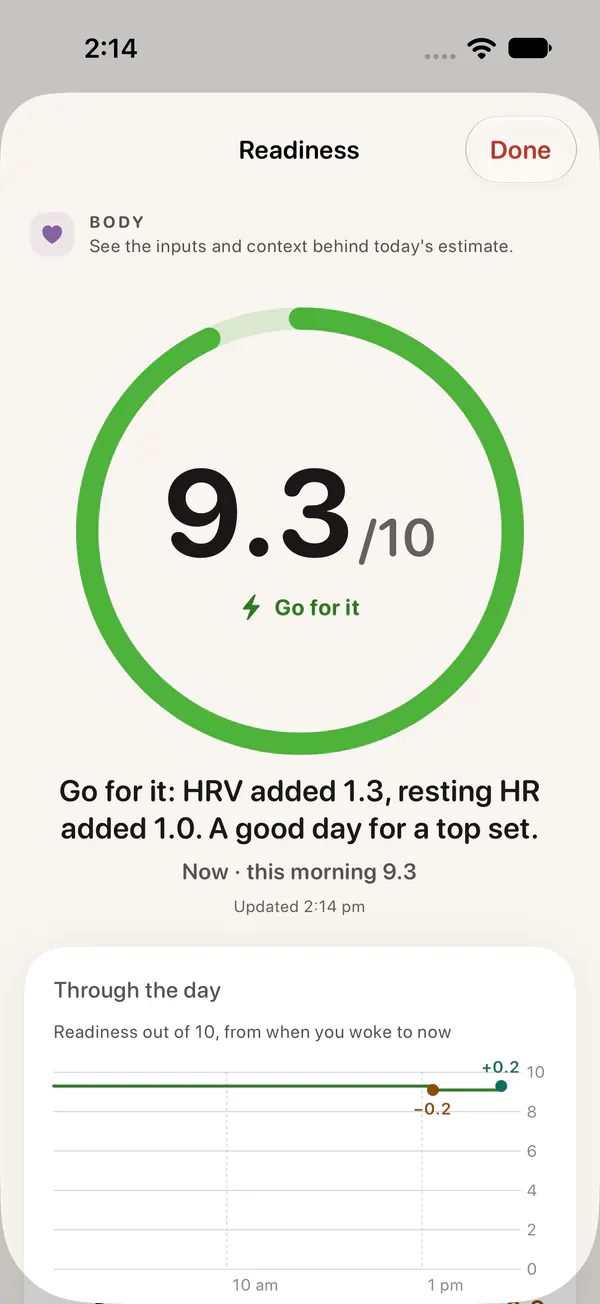

What the number means
Readiness is out of 10, and every score falls into one of four states with one piece of advice:
| Score | State | What to do |
|---|---|---|
| 7.8 to 10 | Go for it | Well recovered. A good day for a top set or a hard session. |
| 5.5 to 7.7 | Ready | Recovered. Train as planned. |
| 3.5 to 5.4 | Pace yourself | Train, but stop a rep or two earlier and skip the extra sets. |
| Below 3.5 | Recover | Choose an easy session, a walk or mobility, and prioritise sleep, fluids and carbohydrate. |
A day exactly at your usual scores 6.6, so “Ready” is the normal state. Scores well above or below it mean something has changed.
What goes into it
Readiness compares last night with your own baseline: the average of your previous 60 nights, not a chart for your age. Each part has a weight, and the parts without data are left out:
- Heart rate variability (35%). Last night’s HRV, the last 7 nights and this morning’s readings, against your baseline. Small changes inside your normal night-to-night swing count for little. Read what a normal HRV is for your age.
- Resting heart rate (20%). Lower than your usual adds; higher takes away.
- Sleep (20%). How long you slept against your own need, and how regular your sleep has been over the week.
- Temperature and breathing (10%). Wrist temperature and breathing rate in sleep. Only a change in the wrong direction counts.
- Training load (8%). Only a sudden spike in your training against the past month takes points.
- How you feel (7%). This morning’s check-in: overall, energy, soreness and stress.
- Heart-rate recovery (5%). How fast your heart rate fell after your last hard effort, against your usual.
Tap the score and you see each of these as a line, with how much it added or took away. The lines add up to the number.
It moves through the day
A morning score goes stale by lunchtime. Bodyvault starts from this morning’s Readiness and moves it with what happens next, and lists every move with its amount:
- A hard workout takes points, more for a session that is bigger than your usual.
- A meal with protein or carbohydrate within three hours of training wins some of that back.
- A nap of 10 minutes or more adds, up to a point.
- Calm stretches add a little; long stretches of high stress take a little.
- Alcohol and a long day awake take points, and so does going too long without eating if you log your food.
- Telling the app you feel worse (or better) later in the day moves it too.
Rest, food and breathing exercises only win back what the day took. A nap is the exception: it can lift you a little above how you woke up, and a little more after a short night.
No made-up numbers
Readiness needs at least 7 nights of HRV and resting heart rate before it shows a score. Until then the app says how many nights it has and how many it needs. In the first weeks, and on nights with few readings, the score is pulled towards your usual and marked with a lower confidence, so one odd night can’t swing it wildly.
The first week: how you feel, every day
For your first 7 days, Bodyvault asks “How are you feeling?” once a day before showing your score. It then shows how often your Readiness matched how you felt, so you can judge the score against your own sense of your body.
What you need
- An iPhone with iOS 26 or later.
- An Apple Watch worn to sleep, or another device that writes HRV, resting heart rate and sleep to Apple Health.
- About a week of nights for your first score. The baseline keeps improving for about four weeks.
Questions
Is this Apple’s Readiness score?
No. Apple doesn’t share its own scores with other apps. Bodyvault’s Readiness is its own, built from the raw data in Apple Health: HRV, resting heart rate, sleep, wrist temperature and breathing rate.
Why does my score show “not enough data”?
Readiness compares you with yourself, so it needs at least 7 nights of HRV and resting heart rate first. Wear your Apple Watch to sleep and the score appears after about a week.
Does it work without an Apple Watch?
Readiness needs overnight HRV and resting heart rate. Any device that writes those to Apple Health works. Without one, the rest of Bodyvault (food, workouts, meal plans) still works on iPhone alone.
Why did my score drop after lunch?
Readiness moves through the day. A hard session, high stress or a long day take points; a nap, a proper meal after training and calm time win some back. Tap the score to see each move and its amount.